The Settings window
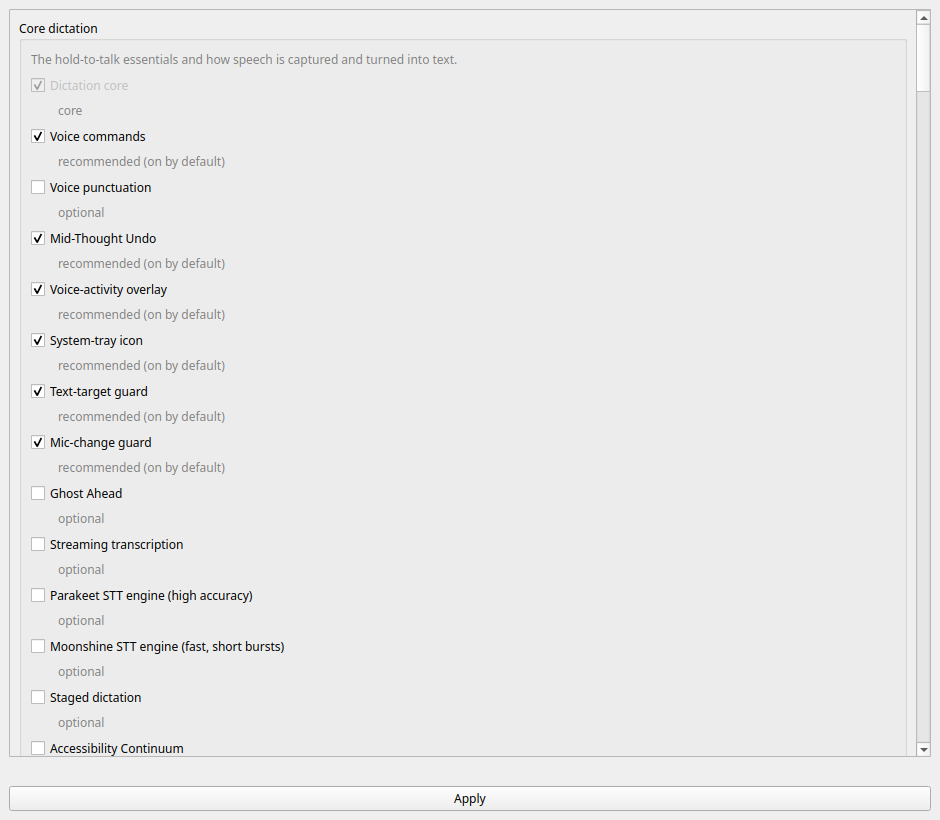
Everything YazSes can do is a switch, and this is the switchboard. It writes the same config.toml keys as yazses features enable/disable, so the window and the CLI can never disagree about what is on.
Opening it
Three ways, all the same window:
- From your app grid — search for YazSes Settings. A
.debor snap install puts it there; apipxoruv toolinstall cannot write outside its own environment, so add it yourself once:
(--uninstall-launcher removes it again.)
-
From the tray — click the "Y" badge → Settings…. Present on Linux, macOS and Windows.
-
From a terminal —
yazses settings.
It needs a graphical session but not a system tray. On a headless or SSH machine use yazses features instead, which does the same job in text.
Reading the window
Capabilities are grouped the way yazses features groups them — core dictation, accuracy and correction, accessibility, and so on — and each row carries a recommendation tier rather than just a checkbox:
| Tier | Meaning |
|---|---|
| on by default | shipped on; leave it unless you have a reason |
| recommended | safe and useful, worth turning on |
| optional | enable it if you want that capability |
| experimental | known rough edges, not advised yet |
A greyed-out row is one that cannot be switched — Dictation core is the pipeline itself, not a feature.
Secondary text follows your desktop theme
Descriptions, hints and the filter status are drawn in a muted colour derived from your palette rather than a fixed grey, and it is computed to stay above the WCAG AA contrast minimum (4.5:1) on whatever background your theme supplies.
This used to be a hardcoded gray, which measured 3.43:1 on a light desktop and 3.44:1 on a dark one — below the readable threshold on both. If your theme's own text colour already falls below that, the window leaves it alone rather than fading it further; that is a theme problem, and making it worse would not help.
Finding a capability
There are around two hundred rows, so the box at the top filters them. It matches the name you can see, the toggle name the CLI uses, the category heading, and the description — so typing stutter finds Dysfluency-Friendly, whose label contains neither word. Several words narrow rather than widen.
Two tokens mirror the yazses features flags rather than inventing a second vocabulary:
| Type | Shows |
|---|---|
on: / off: | only what is currently enabled / disabled |
tier:rec | only one tier — core, on, rec, opt, exp |
on: meeting | combine freely |
A category with nothing left in it disappears with its rows. Filtering is visibility only: a hidden row keeps any change you staged, and Apply and Restore defaults both act on every capability, not just the visible ones.
What does this option actually do?
A checkbox and a name answer "is it on?" and nothing else, which is not enough when there are around two hundred of them. So every row explains itself, three ways — because any single way excludes someone:
- A one-line summary, always visible, under the label: the tier, then the first sentence of the description. Enough to scan a category without hovering anything.
- A tooltip on hover, with the full card.
- A
?button, which opens that same card in a dialog you can reach with the keyboard, tap on a touchscreen, and read for as long as you like. Hover does none of those things, and a screen reader never announces a tooltip at all — which is why the button is there as well, not instead.
The card answers the questions a switch cannot:
| Line | Answers |
|---|---|
| What it does | the capability, in a sentence or two |
| Use when | the situation you'd reach for it in |
| Example | a spoken phrase or command that exercises it |
| Turning it on | the exact config.toml keys ticking the box writes |
| Also installs | any optional Python packages it will download |
| Out of the box | whether it ships on or off — or why it is not a switch |
| Status | the recommendation tier |
Turning it on is the line worth knowing about: it names the real keys, so the window stays auditable against a config file you may also be editing by hand. A greyed row explains why it is greyed there too — "part of the pipeline itself, not a switch", or "designed but not wired into this build yet".
It is the same material yazses features info <name> prints in a terminal, rendered from the same registry entry. The window and the CLI cannot describe a capability differently.
Restore defaults
Restore defaults puts every switch back to the state a fresh install ships with — the on by default and recommended tiers on, everything else off.
It stages, it does not write. Before anything happens it names every capability it would touch, split into what goes on and what goes off, and nothing reaches your config file until you press Apply. A misclick costs nothing.
Three things it will not do:
- It never enables an experimental capability. Those are, by definition, not the advised set, so a reset can only ever switch one off.
- It only touches feature switches. Your hotkey, your microphone, your VAD threshold, your vocabulary and every setting you hand-edited are left exactly as they are. This is a reset of the switchboard, not of
config.toml. - It only writes what actually differs. Rewriting all ~200 keys to change three of them would churn the whole file, comments included.
No graphical session? yazses features reset is the same operation in a terminal, with --dry-run to see the list first — which is also the answer on a distribution too old to load Qt.
Experimental capabilities are refused here as they are on the CLI, where yazses features enable requires --force. That refusal is the point: it is the difference between "you can turn this on" and "we suggest you do".
Features that need extra packages
Roughly fifteen capabilities need an optional Python package — gaze needs mediapipe, Cocktail Filter needs speechbrain, and so on. Ticking one installs it for you, on a worker thread, through the identical system/deps.py call that yazses features enable uses. The two cannot drift on what "enabled" means.
When an install fails, the switch stays on. A failed install is usually transient — a network blip, a slow mirror, a wheel building — and silently un-ticking a box you just ticked discards your intent and leaves no trace of why. Instead the capability is recorded as on and reported as dormant until its packages arrive, a state yazses doctor and yazses features already model and that you can fix by retrying.
Apply, and the restart
Config is read when the daemon starts, so until it restarts you are looking at settings that are not in effect. After Apply, the window offers to restart and then waits for the daemon to answer over IPC before saying it worked — because a command exiting zero is not a daemon that has finished loading a model, and reporting "Restarted!" over a daemon that died on startup is the one thing this flow must never do.
- Declined the restart? The change is saved, and the window keeps showing a restart pending hint. It will not go quiet and let you believe a setting is live.
- Not running at all? It says so, and the change applies when you next start.
- Restart failed? You get the real error, not a shrug.
What it does not cover
The window is the feature switchboard, plus the settings that are values rather than switches:
| Setting | What it decides | Section below |
|---|---|---|
| Hold-to-talk key | which key you hold to dictate | Changing the hold-to-talk key |
| Model | which Whisper checkpoint transcribes you | Speech and text output |
| Language | the language you dictate in | Speech and text output |
| Compute type | the accuracy/speed trade below model size | Speech and text output |
| Vocabulary | names and jargon primed into the decoder | Speech and text output |
| Text injection | how finished text reaches the window | Speech and text output |
| Nowhere to type | what happens with no text field focused | Speech and text output |
| Pre-speech padding | silence added so the first word isn't clipped | Speech and text output |
| Microphone | which input device is captured | Microphone and silence threshold |
| Silence threshold | the level below which audio is discarded | Microphone and silence threshold |
Everything else lives in config.toml, which the window never reformats or reorders, because it writes through a comment-preserving TOML editor.
The threshold slider has a live level meter beneath it: hold your dictation key and speak, and the bar shows whether you are clearing the line. Drag the slider while speaking and the verdict updates against the new threshold, so you can see when you have moved it far enough.
The level comes from the running daemon — it is the process that owns the microphone, and opening a second capture stream here would fight the one dictation uses. With no daemon running the meter says so rather than showing an empty bar, which would read as "your microphone is silent".
Changing the hold-to-talk key
The dropdown at the top of the window sets the key you hold to dictate. It offers the same choices as yazses hotkey set, including auto — the shipped default, meaning "the usual key for this operating system".
It is a dropdown rather than a press-a-key capture on purpose. The platforms bind eleven specific keys; a capture box would accept F13 quite happily and leave you unable to dictate, with nothing on screen connecting the two.
Two keys it will refuse, before writing anything:
- one no backend can bind;
- one that is already your command key — a single physical key cannot be both, or every dictation would be read as a command. Note
right_optionandright_altare the same key under two names, and the check knows that.
The change lands on Apply and takes effect after the restart the window then offers, because the key is bound when the daemon starts.
Speech and text output
The Speech group holds what YazSes hears, how it decodes it, and how the text gets out. Several of these refuse a value rather than saving it, and the refusals are the reason they belong in a window rather than a text editor — each one fails in a way that does not look like the setting that caused it.
Model is the biggest single lever on both accuracy and latency. The list is the same one yazses model list prints, plus whatever your config already holds — a Hugging Face id or a local path is a legitimate model, and it is never silently replaced.
Language is what you dictate in. Auto-detect decides per utterance, which is useful when you switch languages and slightly slower.
Model and language are judged as a pair. A checkpoint ending in .en is English-only and has no language tokens, so pairing it with another language does not fail — Whisper transliterates and hands back fluent English nonsense with no error anywhere. The window will not save that pair, and names the multilingual model to switch to. Change both in one click and it judges the pair you chose, not the one you are replacing.
Compute type is how the model's weights are quantised — the accuracy/speed lever below model size. int8 is the shipped default and the fastest on CPU; float32 is the most accurate and several times slower.
The list is what your machine reports, not a fixed set: the supported quantisations depend on the CPU, and a CUDA build reports different ones again. This matters because an unsupported value does not produce a clear error — it raises inside the model load and is reported as "model unavailable", sending you off to re-download a model you already have, with nothing anywhere mentioning quantisation.
Vocabulary is a short list of words primed into the decoder so it spells them your way — proper nouns and domain jargon it keeps getting wrong. Write them as you would say them, separated by commas. yazses tune proposes additions here from what you actually dictate. (The Parakeet engine has no prompt input and ignores this.)
Text injection is how finished text reaches the focused window. Change it only if text arrives garbled or not at all.
Nowhere to type is what happens when you dictate with no editable field focused, so the words would land in the wrong place or nowhere at all — the state the tray icon shows in yellow. The default copies the text to the clipboard and tells you, so a burst is never simply lost. The guard only acts when YazSes is confident there is no target, so it does not interfere with normal dictation.
Pre-speech padding is silence prepended before the audio is decoded. Raise it if the first word of each burst keeps getting cut off: Whisper needs a moment of lead-in before it starts hearing, and without it the opening word is the one that goes missing. It costs a few milliseconds of decode per burst and nothing else.
All of these land on Apply and take effect after the restart the window then offers. If one is refused, the others still save and the refused value stays on screen next to the message explaining it — so the fix is one more change rather than filling the form in again.
Microphone and silence threshold
Microphone lists the same devices as yazses audio devices, with the same marks: ● is the current system default, ★ is the one pinned here. The first entry, Follow the system default, is what most people should be on — pinning is for when a device steals capture, such as a USB-C monitor arriving mid-session.
If the machine has no sound card, or the audio device is busy, the dropdown is empty rather than the window refusing to open. Every other setting still works.
Silence threshold is the level below which audio is discarded as silence — the number behind every "Silent audio -- discarding" line in the log. Move it left if your speech is being dropped, right if a noisy room triggers stray transcripts. The slider is logarithmic, because the useful range spans three orders of magnitude (≈0.0005 for a quiet voice, ≈0.05 for a noisy room) and a linear one would put every usable value in the leftmost few pixels.
The number beside it is the exact value that will be written, so the slider is a choice rather than a guess.
Related: yazses features for the same switchboard in a terminal, and the feature reference for what each capability actually does.