Offline voice dictation for Linux, macOS & Windows
Hold a key, speak, release — YazSes transcribes your words on-device with faster-whisper and types them into whatever app has focus. No cloud. No API key. No subscription. Nothing leaves your machine.
One command for Ubuntu, Debian, Fedora, Arch and their relatives. It installs YazSes plus the audio, hotkey and typing helpers your session needs, then runs yazses doctor.
winget can trail the newest release by a few weeks; the installer, Scoop and Chocolatey track every one. The build is not code-signed yet, so SmartScreen asks once: More info → Run anyway.
Open YazSes from Applications (on macOS 15+, the first blocked launch is approved with Open Anyway in Privacy & Security). Then switch it on under Accessibility, Input Monitoring and Microphone, and relaunch it. Input Monitoring is the switch people miss.
Generated from the changelog on every build, so this section can’t drift from the code. Development is open: every change lands with its tests, and every decision is written down.
Latest release
v2.46.0
“a Settings window you can actually see”
The Settings window is now a sidebar of pages, so the Features list finally gets the whole window, and 'Apply and restart' from the tray or Settings no longer leaves the daemon stopped on a systemd install.
Every time you hold the key, your audio flows through a fixed pipeline that never touches the network. Hover or tap a stage — the pulse shows a burst moving through it.
01Hotkeytrigger
02Captureaudio
03VAD gate0.063 ms
04Paddinglead-in
05STT decode1 561 ms
06Clean0.005 ms
07Disfluency0.147 ms
08Classify0.075 ms
09Injecttype · keys
Hold-to-talk starts a burst; releasing ends it. The trigger can also be an EMG muscle sensor over USB serial — a hands-free option.
src/yazses/platform/emg/
The stack
CLI · tray · Settings windownever touch the pipeline directly
JSON-RPC 2.0 · Unix socket / named pipe
yazses-daemonone long-lived process · a state machine
injected backends
Pure pipelinedependency-free logic, unit-tested directly
The spine is four states. Meeting capture, read-back, the SSH remote path and enrollment are modes you enter deliberately over IPC — and return from.
Activation seam
“What starts a burst” is a contract. A key and an EMG squeeze already implement it; a wake word, a switch or a BCI would be a third — without touching the pipeline.
Engine seam
SttEngine made Parakeet and Moonshine config changes, not a fork. Anything that turns audio into words plugs in here.
Platform seam
Every OS difference is a Protocol. That is what makes Android a port rather than a rewrite.
From a dictation tool to keyboard‑optional computing
Four eras. Each is a promise kept before the next begins — and every step stays offline, encrypted on-device, and off until you turn it on.
Shipped
Foundation
a tool that works
Hold-to-talk dictation into any app
Linux, macOS and Windows
Voice commands & macros
Encrypted on-device learning loop
Shipped · hands-free maturing
Perception
it hears and sees well
Meeting Mode with speaker labels
Parakeet TDT and Moonshine engines
Gaze targeting & EMG activation
Head-Pointer & face switch (experimental)
Next · under way
Understanding
it knows what you mean
Offline command mode over selected text (shipped)
Settings that install what they enable
Windows add-ons for Parakeet & speaker labels
Android dictation keyboard
The horizon
Recall
it remembers for you
Recall by meaning over everything you dictated
An ambient scribe you control
A computer you talk with — that stays yours
shippedin progressdesigned, aheadresearch horizon
Designed — and deliberately unbuilt
Cloud escalation is fully specified and stays unimplemented, so the offline promise can never erode by increments. Voiceprints, the learning corpus and third-party capture may never leave at all.
Personal speech adapters — including for dysarthria, ALS and Parkinson’s — ship only after a measured accuracy win on held-out data. Ideas don’t ship on their own strength.
40-second tour: the core loop, the command line, and the system tray. Terminal output is real; the command-line typing is re-enacted for legibility. Watch it with narration and chapters on YouTube
Speech is transcribed on-device with CPU faster-whisper (int8). No GPU, no network, no account. No audio, no text — nothing leaves the machine by default.
Because text is injected at the OS level, not inside an app, it lands in VS Code / Cursor Remote-SSH panes, integrated terminals, tmux and container shells — where in-app dictation usually can't reach.
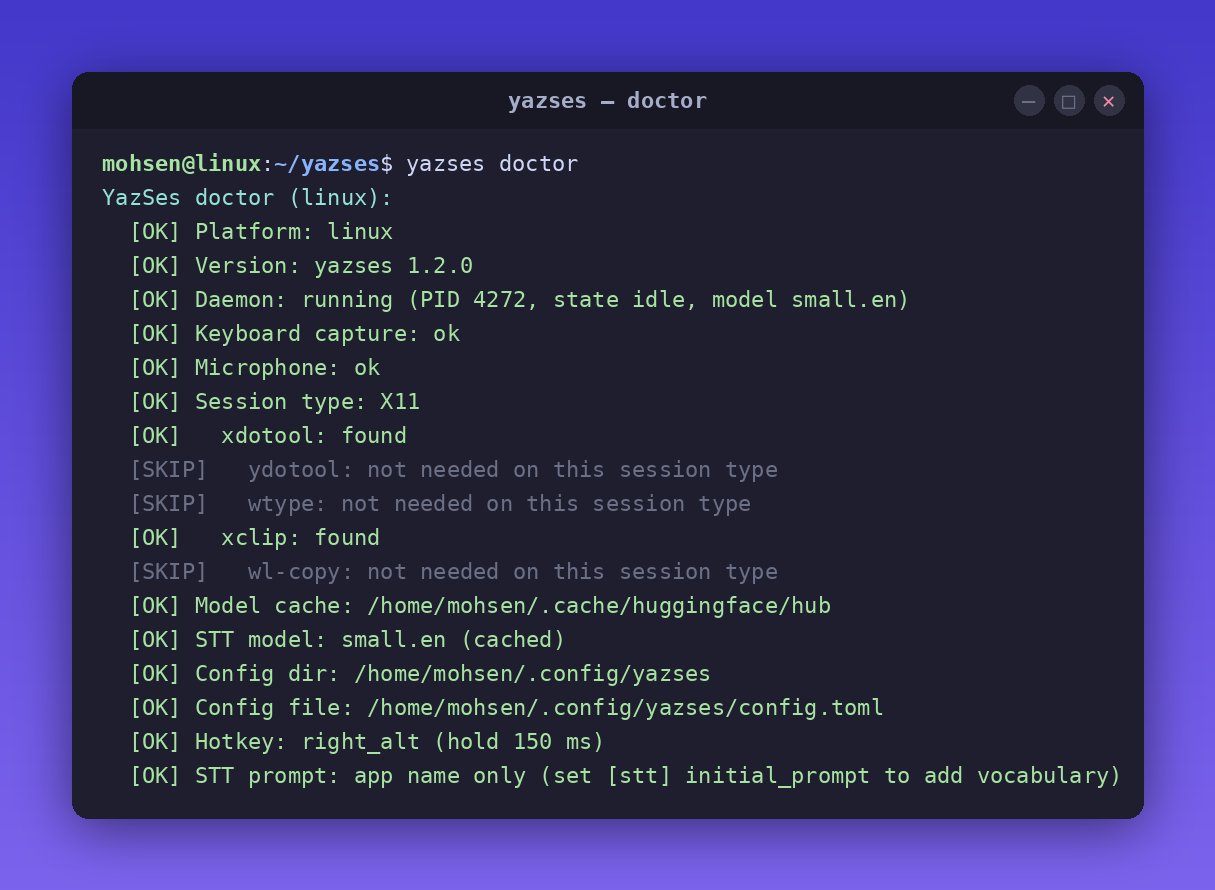
The universal installer provisions audio, hotkey and text-injection prerequisites, then runs yazses doctor. See the Linux install guide for APT, Snap and pipx alternatives.
Preview: supported and installable, not yet verified on hardware by a person on a current build. The validation matrix shows what testers have confirmed so far.
On Apple Silicon, Homebrew is the recommended route:
Apple Silicon and Intel also have native .dmg builds. See the macOS install guide for downloads, Gatekeeper and Accessibility/Microphone permissions.
Preview: supported and installable, not yet verified on hardware by a person on a current build. Two testers have reported dictating on Windows 11; the validation matrix shows what has been confirmed.
wingetinstallMSKazemi.YazSes
winget installs the x64 build, which also runs on ARM64 PCs under emulation. It can trail the newest release by a few weeks; the installer on the latest release, Scoop and Chocolatey (choco install yazses) track every release. See the Windows install guide for SmartScreen and microphone permissions.
pipxinstallyazses
This installs the Python package on supported platforms. On Linux, run yazses setup afterward to provision system dependencies. On macOS and Windows, prefer the platform-specific route above when you want the packaged desktop experience.
The snap on Wayland
The strictly confined snap dictates on X11, and on GNOME/KDE Wayland through the xdg-desktop-portal RemoteDesktop API. It cannot configure or use the host ydotoold service, so the portal is the route it takes; the first dictation asks once for permission and the answer is remembered. The unconfined installs above remain the most-tested Wayland path.
On X11 and Wayland alike, connect both required interfaces after installing, then start it:
yazses setup is not required for the snap. Confinement prevents it from installing host packages, changing groups, or configuring host services, so it can only print the manual permission checklist; the snap already bundles its X11 dependencies.
Installed with pipx on Linux? Provision the host in one command. Skip this if you used the universal installer or APT path — both already do it:
yazsessetup# installs audio + injection deps, joins the input group, sets up ydotoold# then log out and back in (the input-group change needs a fresh login)
Then, on Linux or a pipx install:
yazsesquickstart# machine-tailored next steps; read-onlyyazsesdoctor# check mic, injection backend and permissionsyazsesmic-level--set# tune the silence gate to your room and voiceyazsesstart# start the dictation daemon
On macOS (Homebrew or .dmg) and Windows (winget or the installer) there is nothing to type: open YazSes, grant the permissions it asks for, and it runs from the menu bar or system tray. From the release after 2.43.2 the Homebrew cask puts a yazses command on your PATH; with the .dmg, the CLI is /Applications/YazSes.app/Contents/MacOS/YazSes --cli doctor.
Hold the hotkey (Right Alt on Linux, Right Option on macOS, Right Ctrl on Windows), speak, release — the text appears in the focused app within one to two seconds on a laptop CPU. The quick start walks through each OS step by step.
Offline dictation — type into any focused app with on-device faster-whisper (CPU, int8). No GPU needed.
Transcribe recordings — yazses transcribe meeting.m4a turns any audio/video file into text, fully offline. Add --diarize to tag who said what and --format srt for subtitles. See the transcription guide.
Voice commands — a regex grammar maps phrases to editor/terminal key sequences: "undo that", "save file", "go to line 42", "run the tests", "rename this to user_id".
Macros & personal vocabulary — define multi-step commands and teach YazSes your mis-heard words.
Dysfluency-Friendly Mode — opt-in collapse of stutters/repeats for stuttered or dysarthric speech.
Self-improving — opt-in, encrypted on-device learning corpus; yazses tune proposes accuracy fixes from your own corrections.
Accessibility — VAD calibration, mic-level tuning, and EMG (muscle-sensor) trigger support.
YazSes is not an LLM agent — it dictates text and runs editor/terminal commands; it does not browse, reason over your files, or hold a conversation. It uses CPU faster-whisper (a cloud service may still win on raw accuracy for a noisy mic), ships English-tuned *.en models by default, and is desktop-only.
Hold hotkey → record audio → VAD gate → faster-whisper (CPU)
            → clean + disfluency filter → command grammar (Tier 1 regex)
            → dictate? type it · command? send keys
Two at-a-glance signals show you what YazSes is doing: a top-bar "Y" tray icon whose colour is a live state indicator (🔵 idle · 🟢 dictating · 🟡 no text target → clipboard · 🟣 command mode · 🔴 problem) and an optional sonar overlay that pulses near your cursor while it's listening. See Tray icon & overlay for what each colour means.
Want the CLI itself, not a description of it? Watch it play right here — a real asciinema recording of -h → about → quickstart → features → status, with selectable, copy-pasteable text. Or in your own terminal: asciinema play docs/demo/yazses-cli.cast.
Curious why it works this way?
The research section is a public, fully-cited notebook on post-keyboard input: how accurate webcam eye tracking really is, how offline speech recognition overtook the cloud, and why a $50 muscle sensor beats a $1,000 EEG headset. Every design decision in YazSes traces back to a measurement there — and the open questions are open to anyone.
Does it work without internet? Yes — transcription runs locally; nothing is sent anywhere by default.
What GPU do I need? None. It runs on CPU; 4 GB RAM minimum, 8 GB comfortable.
Does it work on Wayland? Yes. Unconfined installs use wtype/ydotool; the strictly confined Snap uses the xdg-desktop-portal RemoteDesktop API on GNOME/KDE Wayland. The universal installer remains the most-tested Linux path. A hardware-verified record on GNOME and KDE Wayland is still to come (#643).
Is it a replacement for Talon? YazSes focuses on offline dictation plus a practical command grammar. Talon has far more advanced scripting. They can coexist.
Apache-2.0 licensed. If YazSes is useful to you, a ⭐ on GitHub helps others find it.
Want to help? See Contributing — several tasks need no code at all, like translating the README, sharing a config you already use, or adding the microphone that worked for you.
Your voice is yours. Keep it that way.
Free, open source, and fully offline — on the machine you already own.